
Beauty, aesthetics and wellness
A paid Data connector provides one-way access for reporting. It does not write bookings back to Fresha.
View provider connection informationClinicGrower Performance OS
Your marketing, CRM and practice software each hold part of the picture. We built ClinicGrower Performance OS to bring your connected marketing and clinic information into one management view. Directors can review enquiries, bookings, follow-up, treatment plans, team accountability and financial performance, then explore the information with Max AI by voice or text. Your view is built around the systems, access and programme agreed for your clinic.
How we work together
Our team delivers the agreed clinic marketing work. Performance OS and Max AI help you and your team see the connected clinic performance behind it, from enquiries and bookings to follow-up, accountability and finances.
Inside ClinicGrower OS
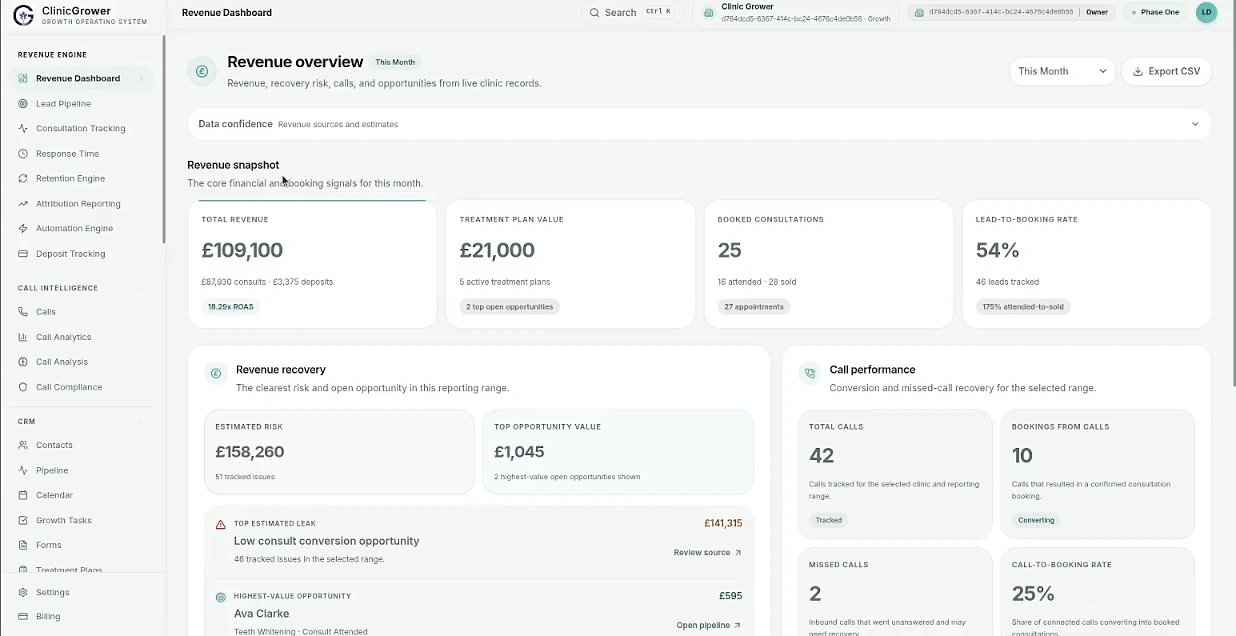
See how the marketing our team delivers connects with the way your clinic responds, books consultations and follows through. Performance OS gives directors a shared view of connected information, with clear responsibilities and practical priorities.
Scroll across the screen to read the detail, or open the full-size image.
See connected enquiry status and response activity, find unresolved follow-up and agree who owns the next action.
Scroll across the screen to read the detail, or open the full-size image.
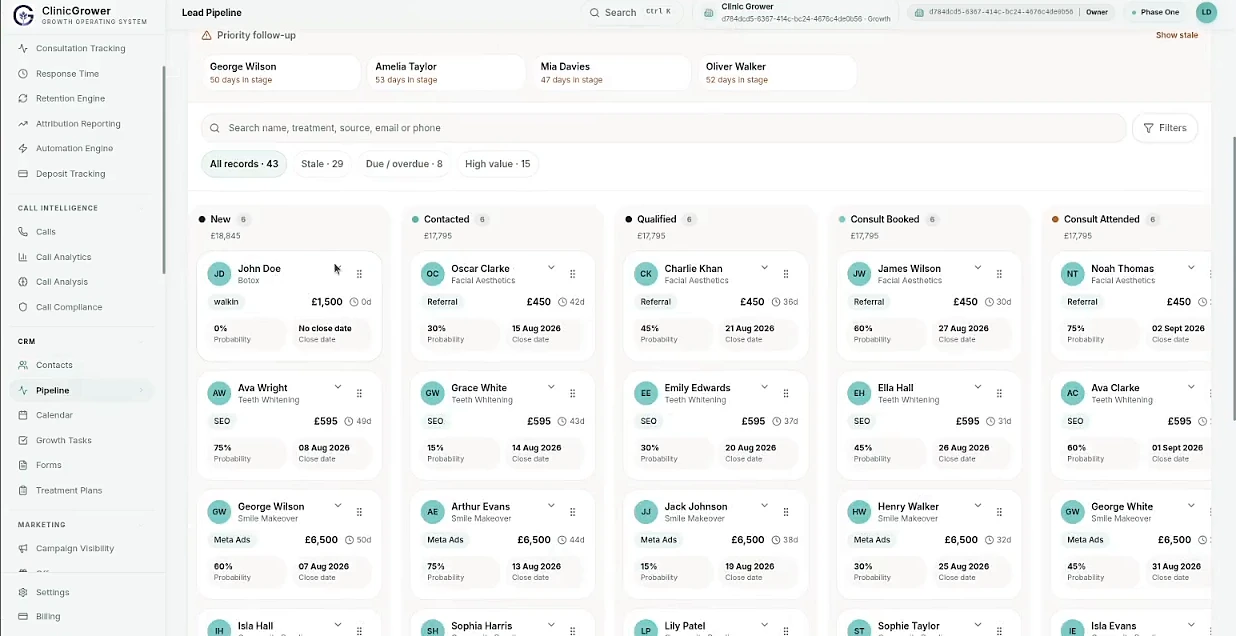
Real product screens with demonstration data. Your clinic’s views are confirmed for your agreed scope, user permissions and supported connections.
Your existing systems. A connected growth view.
Your booking software continues managing appointments and your clinical system keeps patient records. Performance OS brings supported marketing and enquiry information together to help you review your clinic’s growth.
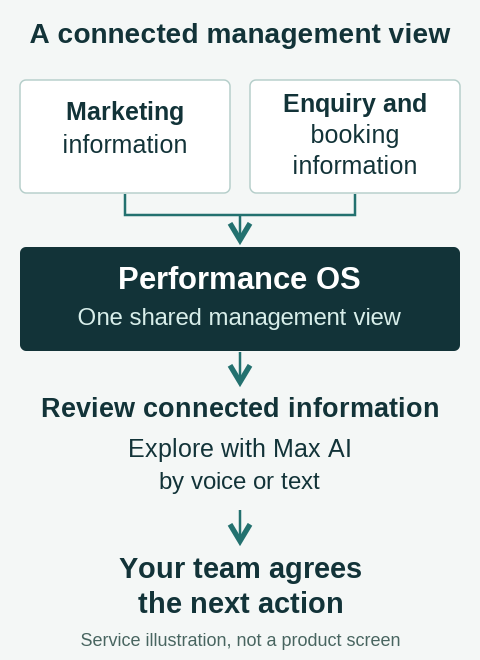
Tell us which systems your clinic already uses. We assess the available connection route and confirm what your setup can include.

Beauty, aesthetics and wellness
A paid Data connector provides one-way access for reporting. It does not write bookings back to Fresha.
View provider connection information
Aesthetic and private clinics
Published API documentation supports assessing a connection around your account access and required information.
View provider connection information
Healthcare and allied health practices
An official API provides a route to assess authorised practice information for your growth reporting.
View provider connection information
Private healthcare
A public API offers a route to assess relevant information, subject to your package and permissions.
View provider connection information
Healthcare and therapy practices
Its current Open API is read-only: reporting access can be assessed, without changing appointments or records.
View provider connection information
Dental practices and groups
Connections follow Dentally’s partner and access requirements. Availability must be confirmed for your practice.
View provider connection informationPlatforms shown for compatibility assessment, not a list of live ClinicGrower integrations or partnerships. Each connection requires confirmed access, scope and testing; provider fees may apply.
Max AI · Voice and text guidance for clinic directors · Available now
Simply talk to Max AI from your phone or laptop. Bring your website, tracking tools and connected clinic software into one central view, then ask where enquiries, follow-up or bookings need attention.
Max AI is live for clients inside ClinicGrower Performance OS. Ask about your connected marketing and clinic information by voice or text, then review the answer and next steps with your team.
See Max AI in actionWhy are we getting enquiries, but the diary still has gaps?
Max AI is available by voice and text. This demonstration illustrates the experience using an example question; it is not a live client answer or an action taken in a clinic.
Questions clinic owners can ask
Compare campaign enquiries with recorded contact attempts and booked consultations for the same period.
Separate a shortage of suitable enquiries from missed calls, slow responses or incomplete booking records.
Give the team a specific check or follow-up task, then review the result before changing the advertising budget.
Illustrative walkthrough, not a live answer. Max can only use supported, authorised connections; missing information must stay visible. Your team reviews proposed actions.
This worked example scores 65 out of 100. The band describes performance within our model; it is not a rating of clinical quality or a market ranking.
Fictional worked example from the v1.0 methodology. Your connected score is shown when its evidence requirements are met. A free external audit does not provide a numeric score.
Make progress visible
See where your clinic stands and which areas deserve attention. The defined model uses ten weighted dimensions and 41 measures to connect marketing with the journey after an enquiry.
Each point should be explainable. Performance, evidence coverage and confidence are shown separately. The Free Clinic Growth Audit costs £0 and reviews public information without a numeric score. The separate Clinic Growth Diagnostic costs £395 + VAT once and reviews agreed connected evidence; a score is provided only when its evidence requirements are met.
The model combines eligible evidence and applies coverage, confidence and essential-dimension checks before publishing a score. Official history is weekly, with interim previews clearly labelled. Performance OS shows the connected evidence, and Max AI helps explain the score and priorities.
Before we connect anything
Start with the questions you want answered. Together, we confirm the connections, information and user access needed to review them.
Review website and campaign activity, tracked calls, forms and messages, enquiry status and response timing. Appointment or revenue information can be included where a supported, authorised connection exists. Reporting identifies any missing information.
Your CRM, booking platform and clinical record system retain their roles. Performance OS supports the growth review; it is not a replacement clinical record. Patient histories and other clinical records stay in the appropriate clinic systems.
We confirm named users, appropriate access, permitted connections, data responsibilities and offboarding arrangements during setup. The agreed scope determines the views available to each role.
Understand Performance OS, the live Max AI assistant and the setup available for your clinic.
Clinic Grower Performance OS is provided by Clinic Grower, the UK clinic marketing agency at clinicgrower.co.uk. It brings supported marketing and enquiry information together alongside your existing CRM, booking software and clinical records. Ask Clinic Grower to confirm your specific connections and scope.
Yes, where the required source and outcome records are connected. Keep the enquiry's available source separate from its progress through contacted, qualified, booked and attended stages. A source label does not prove a booking, and a missing source should remain unknown. Available reporting is confirmed for your clinic during setup.
Performance OS works alongside your existing systems. Your CRM, booking software and clinical records keep their roles, while supported connections bring relevant marketing and enquiry information into one view.
We assess your platform, available access and the information you need before confirming a connection. Fresha, Pabau, Cliniko, Semble, WriteUpp and Dentally have provider-documented connection routes, but these are not a promise of a live ClinicGrower integration. Setup, permissions, testing and any provider fees must be confirmed for your clinic.
Max AI is the live voice and text assistant inside ClinicGrower Performance OS. It helps clinic directors explore connected marketing and clinic information, review performance and understand what needs attention across enquiries, bookings, follow-up, treatment plans, team accountability and finances. Your setup confirms the systems, access and scope for your clinic.
Max AI helps your team understand connected information and agree the next action. Any connected workflow follows the permissions and responsibilities agreed for your clinic. Clinical decisions remain with your qualified clinical team, and a demonstration answer is not a patient instruction or an action taken in your clinic.
Clinic Grower Performance OS is Clinic Grower's operating view for connected clinic growth signals, priorities and accountability. It works alongside your existing CRM, booking platform and clinical record system; connections depend on agreed scope, access and testing.
Your views reflect the tools, permissions, supported connections and data quality available at your clinic. Booking, enquiry and revenue information is shown where the relevant records can be connected.
Access is agreed as part of the clinic's service scope. Named users receive only the views and permissions required for their role.
Yes. They are approved ClinicGrower product screens using demonstration data. The modules and signals available to an individual clinic depend on its agreed scope and connected systems.
Access is role-based and limited to agreed users. Connection scope, permissions and data responsibilities are confirmed during onboarding. Clinical records should remain in the clinic's appropriate source systems.
Yes. Request a demonstration to review the relevant screens, discuss available integrations and confirm what can realistically be connected for your clinic.
See it in context
Talk us through the questions you want to answer. A demonstration gives you a closer look at the relevant screens and helps confirm the connections your clinic would need.